Free to download and use. macOS 14 or later. Reviewed 12 October 2026.
Glance overview
The answer comes first.
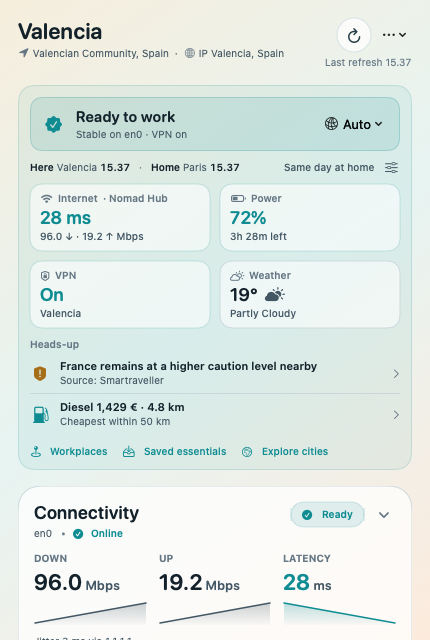
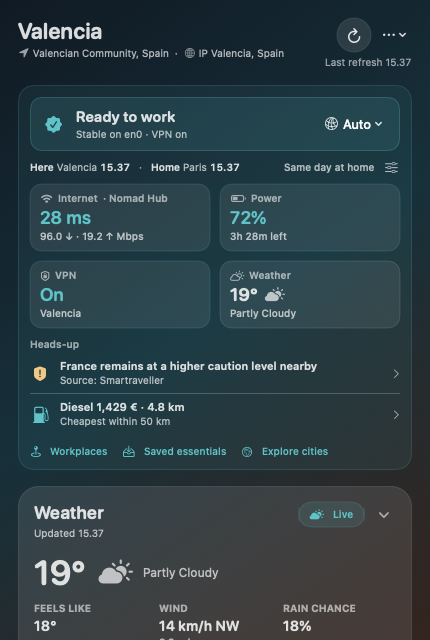
One location-led header, a work-readiness verdict, local and home clocks, and four tappable vital tiles. At most three ranked heads-up items point you to what changed.
A useful first screen
Internet: latency, throughput and Wi-Fi name when available.
Power: charge, charging state and time remaining when available.
Data: metered usage against your cap, or VPN status when Data Guard is off.
Weather: current conditions and today’s temperature range.
Details on your terms
Tap a vital tile or heads-up item to reveal the related card.
Heads-up items cover data caps, travel and weather alerts, wind, rain, holidays and nearby fuel.
Road trip & RV adds sunset and daylight context.
Collapse cards to a summary, reorder them, or change their widths.
App interface rendered from v0.17.2 source with example data.
Connection & power
Settle in with better information.
Check your actual connection and Mac battery before a call or a long session away from a socket.
Internet and network
Internet reachability, latency and jitter.
Passive download and upload throughput, rather than a guaranteed line-speed test.
Wi-Fi name, signal, noise and transmit rate where macOS exposes them.
VPN activity detection; optional quiet alerts for sustained changes.
Battery and clocks
Battery charge, charging state and time to empty or full when available.
Low Power Mode and additional power readings where supported.
Current and chosen home time zones side by side.
Device location and approximate IP location can appear side by side.
Data & offline essentials
Keep the connection in perspective.
Monitor a capped hotspot and choose how much background network work Nomad Dashboard should do.
Data Guard
Default and per-network data caps; remembered metered Wi-Fi networks.
Cumulative upload and download on the default-route interface during monitoring.
Quiet cap warnings at 80%, 95% and 100%.
Remaining allowance and pace estimates where the data supports them.
Pauses Nomad’s own large background downloads at the cap; does not block other apps.
Low Data and saved essentials
Auto, Normal and Low Data modes on the verdict strip.
Bundled local emergency numbers available without a connection.
Bundled embassy locations and ministry contacts after citizenship setup.
Saved weather, fuel, hospital and alert summaries with timestamps.
Live readings and fresh online data still require their usual sources.
Local work logs
Track the work. Keep the record.
Optional project time tracking and a workplace diary live on your Mac, without a separate timesheet service.
Project time tracking
Tracks while your Mac is awake and Nomad Dashboard is running.
Pending-time row with pause, stop, interruptions and an Allocate menu.
User-defined projects and a built-in Other bucket.
Day, week and month review with exact-entry editing, reassignment and splitting.
Interruption summaries and monthly plain-text clipboard export.
Workplace diary
Opt-in collection of stationary visits from authorized device location.
Nearby café or coworking suggestions through Apple MapKit.
Confirm or edit suggested venues; add private notes.
Keep connection and work-readiness context with local diary entries.
Map handoff is an explicit action. This is not a synced team or invoicing tool.
Weather & a sense of place
See what the day has in store.
Current conditions, local context and destination exploration sit beside your work essentials.
Weather and local information
Current conditions, feels-like temperature, wind and precipitation.
Expandable hourly and multi-day forecasts.
Sunrise and sunset calculated locally, independent of the weather service.
Public holidays and school holidays where a confident regional match is available.
European country-level price comparisons; US one-bedroom rent benchmarks need a HUD token.
Explore cities
Native Around me and Discover views, with destination photo cards.
Search by country, monthly budget and minimum city internet speed.
Source-linked cost estimates, work signals and community ratings from Nomads.com.
Current-city context can follow your location; disable Follow my city to stop automatic lookups.
Estimates may age and city-level internet ratings are not measurements of your connection.
Travel profiles & optional tools
A dashboard for your kind of journey.
Nomad and Road trip & RV set the recommended card order and heads-up priorities. Switching profile keeps a customized order.
Road trip & RV
Weather, fuel, emergency care, power and data allowance move forward.
Daylight heads-up within two hours of sunset, with caution in the final hour.
Civil twilight and next sunrise context when it is dark.
Optional top caution or attention item in the menu bar.
Daylight uses on-device calculation from available location context.
Choose your travel modules
Travel advisories, with optional weather alerts and regional security.
Nearby fuel prices and map previews in supported regions.
Nearby emergency hospitals with map previews and map handoff.
One configured surf spot forecast.
Coverage and freshness vary; German fuel prices require a Tankerkönig API key.
Road trip & RV profile, rendered from v0.17.2 source with example data.
Emergency & embassy essentials
Useful contacts, close at hand.
Emergency-number lookup and Your Embassy use bundled data and work offline when the app has current country context.
Emergency care
Verified, bundled emergency numbers for 77 countries.
Separate rural or highway police numbers in Morocco, Spain, Brazil and Thailand where listed.
Local emergency numbers at the top of Saved essentials.
Nearby hospital searches are a separate online feature.
Your Embassy
Choose up to three citizenships, stored only on your Mac.
Nearest listed embassies and consulates of your country.
Verified foreign-ministry consular lines, with published staffing notes.
EU or Nordic mission suggestions where relevant and no own mission is listed.
Official ministry, mission-directory and trip-registration links; mappings can be incomplete or stale.
Visited places
Keep a local memory of the journey.
Save your place history, review where the year went, and correct your own country-day record.
Places and paths
Local visited-city and country history with a map window.
Yearly travel paths when chronological place events are available.
Year and month country-day breakdowns.
Add, edit or restore country-day records and export summaries.
How records are built
Device location is preferred; approximate IP location is a fallback.
Some missing days can be estimated from surrounding observations.
Collection can be turned off in Settings.
History stays on your Mac; it is not a multi-device synced journal.
Visa and tax-day calculations are not part of the released app.
Layout & settings
Make room for what matters to you.
Compact cards and a seven-page Settings sidebar keep useful detail reachable without taking over the first screen.
Your layout
Collapse cards to one line and retain that choice across launches.
Reorder cards and customize card widths.
Disabled modules share one Turned off row.
Light and dark appearance, menu bar options and launch at login.
Find the right setting
General, Weather & Local, Safety, Connection & Data, Work, Privacy & Location, and Advanced.
Card shortcuts open the relevant Settings group.
Optional modules, location access, work logs and refresh settings.
Signed public releases support Sparkle updates.
Privacy & control
Local where it matters. Clear about the rest.
Personal records stay local; network-backed features connect to their providers. Read the app’s full privacy notes for the current details.
Stored on your Mac
Projects, exact time entries and interruption events.
Workplace diary, private notes and preferences.
Visited places, country-day history and citizenship settings.
Data Guard’s remembered networks and measured totals.
Network and analytics
Device-location features need permission; external IP location can be disabled.
Weather, travel feeds, fuel, city data and some map actions use external providers.
Anonymous analytics are on by default; some basic install, launch and background reach events are always sent.
Analytics payloads omit personal records, citizenship and location.
The analytics setting controls the remaining usage events; see the full privacy notes.
Android is in development. Ongoing macOS work includes stays and visa-day calculations, arrival briefings, local rhythm, UV and air-quality heads-up items, and Siri, Shortcuts and widgets.
These are not included in v0.17.2. Availability, timing and final behaviour may change.